

How is AI Improving Document Analysis?
AI is changing how teams handle documents. Instead of flipping through pages or running keyword searches, you can now get smart, automated help.
But this isn’t just some shiny tool for the tech crowd. It’s real software doing real work, and it’s based on some pretty solid technical methods.
Let’s break it down so it actually makes sense and gives you something useful to walk away with.
Natural Language Processing (NLP) for Context
AI uses NLP to understand not just words but also meaning. So when a system reads a clause in a contract, it’s not just picking up on the phrase “termination clause.” It understands what the clause says, how it might affect the agreement, and even if it’s missing compared to other contracts.
What this helps with:
- Clause comparison
- Detecting tone or legal risk
- Identifying obligations, deadlines, or penalties
Optical Character Recognition (OCR) for Scanned Documents
OCR converts images or scanned PDFs into readable text. It’s not new, but AI-powered OCR is way better than the old stuff. Basically, it can deal with blurry scans, messy handwriting, or weird formatting.
Why it matters:
- Reads scanned contracts, forms, and IDs
- Pulls text into structured formats
- Works even if the original file isn’t perfect
Entity Recognition to Extract Key Details
AI looks for entities, things like names, dates, company names, or invoice totals. It tags them and stores them in the right fields. This makes search, filtering, and reporting a lot faster.
Use cases:
- Pulling vendor names from contracts
- Finding due dates in service agreements
- Extracting dollar amounts from invoices
Document Classification With Machine Learning
Instead of dragging files into folders or guessing what’s in them, AI classifies all kinds of legal or business documents automatically. It learns from examples and gets better the more you use it.
What it does:
- Sorts files by type (contract, resume, invoice, etc.)
- Routes documents to the right team or workflow
- Flags items that look out of place
Semantic Search and Comparison
Keyword search is basic. AI does semantic search, which understands what you’re really looking for.
If you’re searching for “termination rights,” it’ll find similar language like “early exit,” “contract end,” or “mutual withdrawal.”
Helpful for:
- Contract review
- Finding past versions of documents
- Spotting clause changes or inconsistencies
Data Validation and Error Detection
AI can compare data across multiple documents to flag errors or gaps. For example, if two versions of a contract list different payment dates or customer names, AI calls it out.
Benefits:
- Avoids costly mistakes
- Speeds up QA
- Keeps data consistent across systems
Common Use Cases for AI-Powered Document Analysis
AI-powered document analysis shows up in more places than you’d think. If you’re dealing with contracts, forms, or any kind of paperwork, chances are, AI can take some of that off your hands. Take a look at where people are already putting it to work.
1. Legal Document Analysis
If you’re spending hours reviewing contracts or checking for missing clauses, you’re not alone. Legal work is full of repeat tasks that take forever.
Luckily, AI can handle a lot of that for you. It doesn’t replace your judgment, but it helps you move faster without skipping important details.
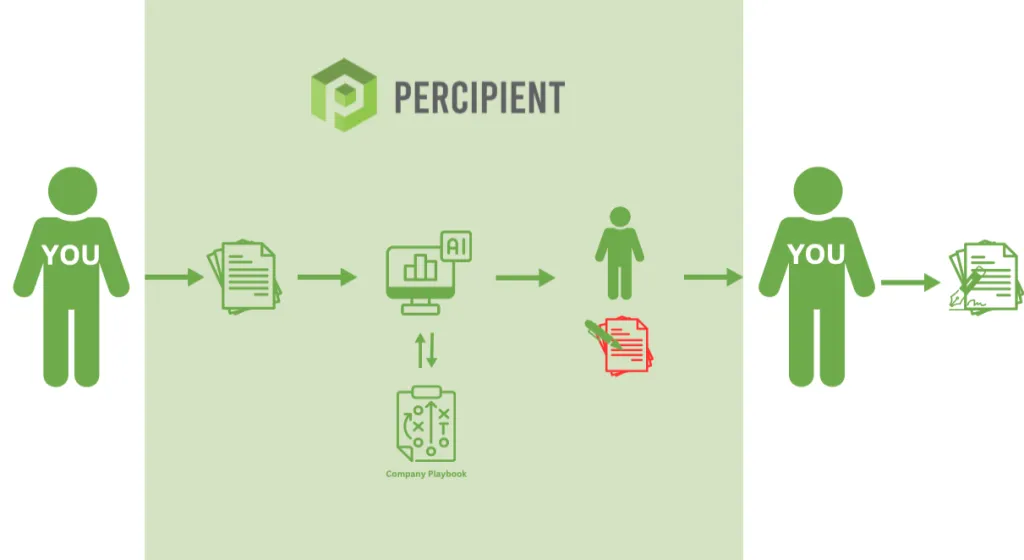
AI can scan legal documents, find key terms, and flag anything that looks off. You still get the final say; it just gets you there quicker.
Here’s how AI helps with legal document review:
- Spots missing or unusual clauses
- Flags differences between versions
- Finds dates, names, and payment terms
- Highlights risky language
- Helps with compliance checks
Tools like Percipient do this well. It uses AI to handle the bulk of the work, then lets legal experts step in to review and finalize. You don’t need to start from scratch every time.
To see how it really works, book your discovery call today!
If you’re tired of scanning the same types of documents over and over, this kind of help makes a big difference.
2. Analyzing Documents for Valuable Data
AI with document intelligence can read and analyze documents the way you would, only faster. It pulls out the valuable data you actually need, whether you’re dealing with customer records, invoices, applications, or shipping documents.
Instead of skimming line by line, you get clean, accurate info like names, dates, totals, and reference numbers in seconds. The system understands context, so it knows what each piece of data means and where it belongs. No more second-guessing or double-checking.
If your day involves sorting through piles of paperwork or pulling info from different formats, this tech can seriously lighten your load. It helps you move faster, avoid errors, and spend more time making decisions, not copying and pasting.
3. Automating Data Entry With AI
Manual data entry slows things down and makes it easy to miss details. AI fixes that by handling document processing for you.
It reads unstructured data from forms, invoices, or even scanned files, then extracts information like names, totals, or dates and sends it to the right system without you having to lift a finger.
Let’s say your team gets a stack of delivery forms each day. Rather than sorting through each one and entering the info by hand, AI pulls out the shipment ID, date, and destination and updates your records automatically.
This kind of setup works across industries like logistics, healthcare, finance, and HR. When the work involves moving data from one place to another, AI handles the routine so you can focus on what actually needs your attention.
4. Sorting and Understanding Lengthy Documents
Reading long documents just to find a few key points is exhausting. Plus, it can be a complete waste of time when you’ve got better things to do.
That’s where document AI makes a difference. It helps you classify documents, extract data, and break down lengthy content into the most important parts.
Whether you’re dealing with 50-page reports, multi-part agreements, or detailed forms, AI can quickly scan and sort them for you. It doesn’t just read the text but understands what the document is about and picks out the important pieces.
Here’s what document AI can do with long, detailed files:
- Classify documents by type (report, invoice, application, etc.)
- Pull out key data points like totals, terms, or contact info
- Summarize long sections so you don’t have to read the whole thing
- Highlight differences between versions or drafts
- Flag missing information or unusual entries
5. Connecting AI to Business Processes
Manually moving data from documents into your systems takes too much time and creates room for mistakes.
AI can step in and handle data extraction automatically, and when connected to tools like Google Cloud Console, it becomes part of your daily workflow. You get clean, structured data without switching between apps or rechecking every field.
Let’s say you receive customer applications by email. AI can pull names, addresses, and service details, then push that data straight into your CRM or support system.
You don’t have to read through each file or type anything out. The process runs in the background and keeps everything updated as new documents come in.
If your team works with a steady flow of incoming forms, invoices, or reports, tying document analysis into your business processes helps you stay on top of things without falling behind. You spend less time fixing errors and more time getting actual work done.
Harness the Power of AI & Human Expertise With Percipient
As you can see, AI can take care of the busywork—reading, sorting, and extracting data from documents at scale. But sometimes, you still need a human to check the fine print or make a final call.
Percipient brings both together in one place. You get the speed and accuracy of AI plus the insight of experienced reviewers who know what to look for.
Whether you’re processing contracts, forms, or reports, Percipient helps you move faster without losing control. Their platform pulls out the key data, flags issues, and keeps everything organized so you spend less time reviewing and more time doing the work that matters.
Ready to make document review faster and easier? Book your discovery call today!
FAQs About AI For Document Analysis
Is there an AI that can analyze a document?
Yes, there are AI tools built to analyze documents by reading content, identifying patterns, and pulling out important details like names, dates, and totals. Some even handle key value pairs and support custom rules for different document types.
Is there an AI that can scan documents?
AI can scan and understand both digital and scanned documents. With built-in OCR (optical character recognition), it can read text from images or PDFs and then extract useful information from them.
Is there any AI for documentation?
There are AI platforms designed for working with documentation. These tools can organize, classify, and extract data from different file formats, making it easier to manage large volumes of content without manual sorting.
What is the best AI tool to summarize documents?
Several tools can help, but the best one depends on what you’re working with. Some platforms focus on short summaries, while others offer more advanced features like document chat, where you can ask questions about the file and get instant answers. Look for tools that also support key value pair extraction if you need structured outputs.
The post How AI For Document Analysis Works in Real Workflows appeared first on Percipient – Legal Services Powered by Technology.