
Your law firm’s online reputation is often the first impression potential clients get. With over 90% of clients reading online reviews and 87% trusting Google reviews, managing your reputation is crucial.
Key takeaways:
- 88% of clients prefer firms that respond to reviews, making engagement essential.
- 71% of clients may update negative reviews if their concerns are addressed.
- Automated tools streamline review collection, monitor platforms like Google, Avvo, and Martindale-Hubbell, and ensure compliance with ethical standards.
Top tools include:
- Birdeye: Automates review requests and integrates with legal CRMs.
- Podium: Focuses on SMS-based review collection.
- ReviewTrackers: Centralizes multi-location review management.
- SiteJabber: Repurposes reviews for broader visibility.
- Reputology: Offers instant alerts and detailed analytics.
These tools simplify reputation management, helping you maintain a strong online presence and attract more clients.
What to Look for in Lawyer Reputation Tools
Not all reputation management tools are designed with law firms in mind. The right software should cater to legal-specific needs, like handling directories unique to the legal field, adhering to ethical standards, and fitting into your current workflow. Below, we break down the key factors to consider when choosing a tool that not only gathers reviews effectively but also works effortlessly with your legal operations.
Review Collection and Management
A strong reputation tool simplifies the review process from start to finish. Look for features like automated SMS and email campaigns that are triggered at strategic moments – such as after a case resolution. It’s essential that the tool monitors legal-specific platforms like Avvo, Lawyers.com, Martindale-Hubbell, and Justia, rather than just general sites like Google or Yelp.
A centralized dashboard can help you manage feedback across all platforms, whether you operate a single office or multiple locations. Some tools even include pre-screening systems, like a “thumbs-up/thumbs-down” feature, to guide satisfied clients toward public reviews while redirecting unhappy ones to private feedback. Additionally, AI-driven response tools can help you craft professional and personalized replies quickly. However, ensure the AI avoids referencing case details or confirming attorney-client relationships to stay compliant with ethical guidelines – this is a critical consideration for any reputation strategy.
Analytics and Reporting
Simply counting reviews doesn’t give you the full picture. Advanced tools offer features like sentiment analysis, which can reveal patterns in client feedback to highlight your firm’s strengths and identify areas for improvement. Some platforms also include competitor benchmarking, helping you see how your ratings stack up against other firms. For example, research shows that 73% of potential clients focus on reviews written within the last month.
The best tools allow you to break down performance metrics by attorney, practice area, or office location, making it easier to identify trends and make informed decisions. And to streamline your operations, ensure the tool integrates smoothly with your existing systems.
Software Integration Options
Standalone reputation tools can create unnecessary work. Opt for a solution that syncs directly with your practice management software. This integration ensures client contact information and case updates flow automatically, so review requests are sent promptly when cases close – without any manual input. Two-way synchronization keeps client lists up to date, while integration with platforms like Outlook, Gmail, and SMS ensures every interaction is logged.
Personalization is key, and the best tools use merge fields to customize review requests with details like attorney names, practice areas, and case specifics, making each message feel genuine. Security is another priority – features like Single Sign-On (SSO) and role-based access control are crucial, especially since 29% of law firms have reported security breaches.
“43% of respondents prioritized integration with trusted software.” – American Bar Association’s Legal Industry Report 2025
For firms using The Legal Assistant software, integrating a reputation management tool can seamlessly tie review collection into your case-closing workflow, saving time and effort while maintaining a professional image.
sbb-itb-95f4849
5 Reputation Management Tools for Law Firms
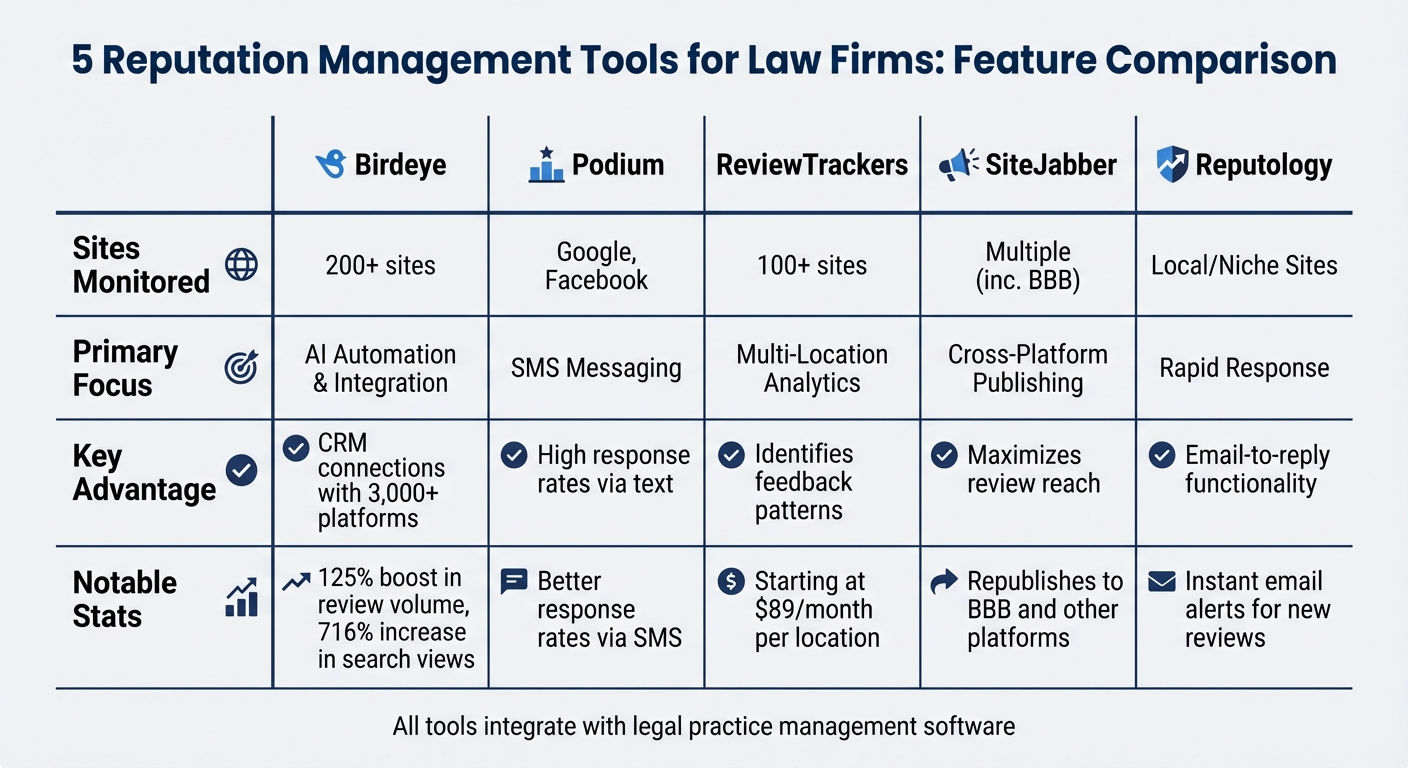
Comparison of Top 5 Lawyer Reputation Management Tools
Choosing the right reputation management tool can make a huge difference in how your firm handles client feedback. Below are five platforms specifically designed to tackle challenges law firms encounter – whether it’s automating review requests or analyzing feedback trends. Each tool brings a distinct set of features to meet the unique needs of legal practices.
Birdeye: Automated Review Requests and AI Responses

Birdeye excels in automation and integration, making it a favorite for many law firms. It connects with more than 3,000 CRMs. This integration allows review requests to be sent automatically when cases close. Additionally, its AI assistant, BirdAI, can craft professional responses to reviews and even generate social media posts, helping reduce administrative tasks.
From a single dashboard, Birdeye monitors over 200 review sites, including Google, Facebook, and legal directories. Patterson Law Group saw impressive results after adopting Birdeye in 2019, collecting over 200 authentic reviews and gaining recognition as the 2019 Birdeye Best Lawyer. Other law firms using Birdeye have reported a 125% boost in review volume and a 716% increase in search views.
Podium: Client Messaging and Review Collection

Podium takes a text-first approach, leveraging SMS to request reviews. Text messages often yield better response rates compared to email, making it easier to gather client feedback. The platform also features a centralized inbox where lawyers can manage client messages and track review requests in one place. This streamlined system ensures that firms capture positive feedback efficiently.
ReviewTrackers: Multi-Office Review Monitoring
For law firms with multiple locations, ReviewTrackers simplifies review management by offering centralized monitoring across more than 100 review sites. Its built-in analytics identify recurring themes in client feedback, helping firms address operational issues or promote their strengths.
“ReviewTrackers… gathers all of your client’s feedback so you can better understand their needs. It can show you which feedback shows up most frequently and which may be helpful for fixing processes behind the scenes.”
– Chris Dreyer, CEO of Rankings.io
Plans for ReviewTrackers start at $89 per month for a single location. It also includes a competitor benchmarking feature, allowing firms to see how their ratings stack up against others in their market.
SiteJabber: Verified Reviews and Client Engagement
SiteJabber takes review management a step further by republishing positive reviews across platforms like the Better Business Bureau (BBB). This strategy amplifies the visibility of testimonials, ensuring they reach a broader audience. With 83% of potential clients checking online reviews before choosing a lawyer, this feature can significantly enhance your firm’s online presence.
Reputology: Advanced Analytics for Law Firms

Reputology focuses on local market insights, sending instant email alerts for new reviews. This allows lawyers to respond directly from their inbox without logging into multiple platforms. Its analytics tools track reputation trends over time, highlighting where your firm is excelling and where improvements are needed. Considering that 88% of people prefer businesses that respond to all reviews, Reputology’s rapid notification system ensures no feedback goes unanswered.
| Tool | Sites Monitored | Primary Focus | Key Advantage |
|---|---|---|---|
| Birdeye | 200+ | AI Automation & Integration | CRM connections with 3,000+ platforms |
| Podium | Google, Facebook | SMS Messaging | High response rates via text |
| ReviewTrackers | 100+ | Multi-Location Analytics | Identifies feedback patterns |
| SiteJabber | Multiple (inc. BBB) | Cross-Platform Publishing | Maximizes review reach |
| Reputology | Local/Niche Sites | Rapid Response | Email-to-reply functionality |
Automating Review Requests and Follow-Ups
The Legal Assistant uses case ‘events’ or milestones to trigger automated review campaigns. For example, marking a case as “Closed Matter” or using a custom sub-status like “Closed – Positive” prompts the system to send review requests via email or SMS.
Some integrations go further by incorporating pre-screening surveys. These surveys help redirect negative feedback privately while guiding satisfied clients to public review platforms. For instance, a quick sentiment survey can assess client satisfaction before linking them to review sites. Advanced tools even utilize AI to monitor client sentiment throughout a case, ensuring review requests are sent when clients are most likely to leave a 5-star review. This approach addresses a common issue – 80% of law firm clients report feeling “uncared for” – by ensuring thoughtful, timely outreach.
Managing All Data in One Place
Centralizing reputation metrics within The Legal Assistant eliminates the hassle of logging into multiple platforms like Google, Facebook, or Avvo. Instead, a single dashboard provides a clear view of review counts, average ratings, and recent feedback alongside case details. This real-time insight is critical, as 73% of clients prioritize reviews written in the past month.
Having all this data in one place also helps uncover areas for operational improvement. For example, recurring mentions of slow response times in reviews can highlight issues to address before they grow. Additionally, the integration ensures consistent NAP (Name, Address, Phone) information across directories, which directly supports local SEO efforts. Accurate, synchronized data not only saves time but also protects your firm’s online visibility, which is vital since 90% of local consumers rely on reviews when making hiring decisions.
A unified dashboard doesn’t just track reviews; it also enhances personalized follow-ups, making it easier to respond promptly and effectively.
Using Reputation Data to Improve Client Communication
The Legal Assistant’s capabilities go beyond automation by enabling tailored client communications. Task management and calendar tools can coordinate follow-ups with reputation tools, ensuring requests are sent at appropriate times. Multi-channel outreach through email and SMS improves response rates, and tools like URL shorteners keep messages concise and professional.
Drip campaigns are another effective strategy. Instead of overwhelming clients with repeated requests, set reminders at 30-, 60-, or 90-day intervals. When new reviews come in, instant dashboard alerts allow for quick responses. This is particularly important since 88% of consumers prefer businesses that actively engage with their online reviews.
For negative feedback, skip the templates and craft thoughtful, personalized responses. As Vanguard Communications puts it:
“A response isn’t just for that one reviewer, it’s for everyone who will ever read that review and the response. Consider it the chance to cross-examine … nicely”.
This approach not only reassures current clients that their concerns are taken seriously but also demonstrates professionalism to potential clients who may read those reviews in the future.
Conclusion: Choosing the Right Reputation Tools for Your Firm
Picking the right reputation management tool depends on your firm’s specific needs. For instance, if you’re a solo practitioner handling a handful of cases each month, you likely don’t need the multi-location monitoring capabilities that a larger firm would require. Start by identifying the must-have features for your practice – such as compliance with HIPAA, integration with your case management system, and the ability to track reviews across platforms like Google, Avvo, Martindale-Hubbell, and Lawyers.com.
The stats speak volumes about the importance of reputation management. Ninety percent of clients check online reviews before hiring a lawyer, and nearly 75% of them focus on reviews from the past month. Even more striking, 80% of potential clients will encounter at least one negative review online. This makes real-time alerts and automated review requests essential tools for capturing positive feedback when client satisfaction is at its peak.
When exploring your options, prioritize tools that save time while boosting the number of reviews. Features like AI-driven templates ensure professional responses to every review, while automated SMS and email campaigns – triggered at key moments in a case – keep the feedback pipeline active. In fact, 72% of clients will leave a review if asked directly, and firms using specialized review software often see their review count triple within just three months. Integration is key here; by combining these features with your case management system, you can streamline your workflow and centralize data.
When used effectively, reputation management tools do more than just automate processes – they help turn positive reviews into lasting trust. By automating review collection and maintaining personalized responses, you can convert prospects into loyal clients. This is especially important given that 80% of law firm clients report feeling “uncared for”. As Jane Hart, Head of Digital Marketing at SelectedFirms, aptly puts it:
“A good online reputation is key to attracting clients, especially now that most of today’s clients do research on a law firm before making a decision”.
FAQs
How do reputation management tools help lawyers stay compliant with ethical standards?
Reputation management tools play a key role in helping lawyers stay compliant with ethical standards. They offer features like guidelines and templates to ensure responses to client reviews align with bar association rules. This includes avoiding misleading statements and safeguarding client confidentiality.
These tools often come with functionalities such as content moderation, review verification, and audit trails. These features make it easier for law firms to ethically manage their online presence by monitoring reviews and mentions. Lawyers can address client feedback promptly while maintaining their professional responsibilities, ensuring their online presence reflects both integrity and trustworthiness.
What key features should law firms look for in a reputation management tool?
When choosing a reputation management tool, law firms should zero in on features that support a strong and trustworthy online presence. One key feature to look for is automated review management, which simplifies collecting client feedback and responding to reviews quickly and effectively. Tools that track online mentions across various platforms – like social media and legal directories – are also critical for staying on top of what’s being said about the firm.
Another important consideration is accurate business listing management. This ensures that details like the firm’s name, address, and contact information remain consistent across platforms such as Google Business Profile and legal review sites, which can boost local SEO efforts. Additionally, integration with legal practice management software, such as The Legal Assistant, can streamline operations by consolidating reputation-related tasks and analytics. This not only saves time but also helps maintain ethical standards.
By focusing on tools that combine review management, monitoring, and directory accuracy with seamless software integration, law firms can strengthen their online reputation and draw in more clients.
The post Guide to Lawyer Reputation Tools appeared first on The Legal Assistant.