

Key takeaway: Legal document automation software is a tool that creates smart, customizable templates for common legal files and forms. Law firms can use this software to quickly generate and share documents with clients—eliminating issues with human error, versioning, and access.
Document creation and management are non-negotiable parts of the daily grind in the legal industry. Whether it’s contracts, deeds, agreements, invoices, letters, wills, policies,, they all require a decent amount of work and time to generate, review, and process.
Managing these documents is an essential but time-consuming task. That’s why many firms have adopted legal document automation software to streamline file drafting and management. Generative AI has especially changed the game in recent years.
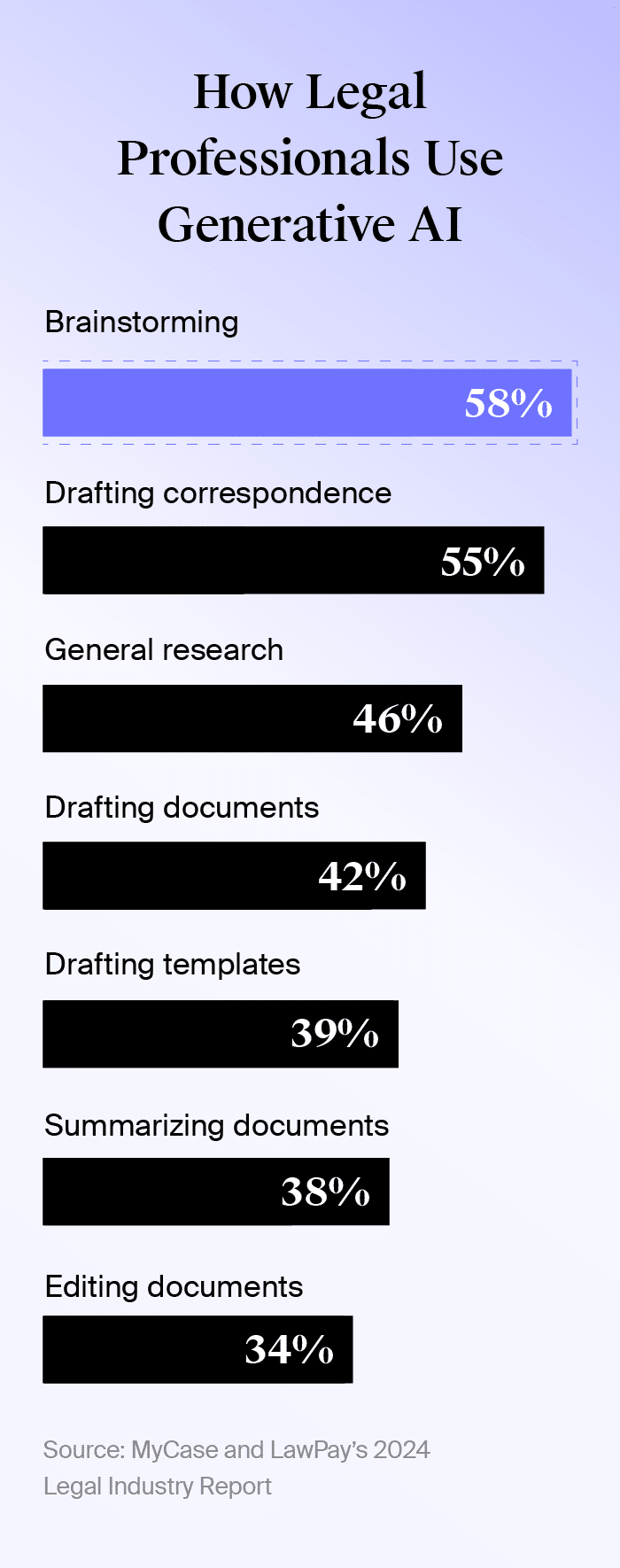
For example, our 2024 Legal Industry Report found that legal professionals use generative AI for the following tasks:
- 58%: brainstorming
- 55%: drafting correspondence
- 46%: general research
- 42%: drafting documents
- 39%: drafting templates
- 38%: summarizing documents
- 34%: editing documents
Generative AI is one of many features behind legal document automation software. Rather than assembling and generating documents manually, automation can generate templates, auto-populate information, and enable electronic signature and document sharing.
In this article, we’ll cover the basics and benefits of legal document automation software, how to choose a solution, and features to consider when deciding.
What Is Legal Document Automation Software?
Legal document automation software is a tool for creating, editing, and managing legal files at scale.
Typically, this software uses pre-existing data to auto-populate a new document. Law firms can use automation to draft contracts, invoices, purchase agreements, leases, licenses, and more. Document automation software for lawyers can be a standalone product or built into legal case management software.
How To Choose the Best Legal Document Automation Software
Choosing the best legal document automation software takes some investment. It can feel overwhelming, but creating a plan and understanding your needs can make the process more manageable.
Use the steps below to build a plan for your law firm:
- Define your budget and timeline. Routinely revisit these parameters to help prevent this process from taking up too much time, falling off your radar, or derailing your budget.
- Understand your needs and how it will support your law firm. Prioritize your firm’s most important needs to narrow down your search.
- Determine your law firm’s capability to handle a new tool. Estimate how much non-billable time you can dedicate to testing, onboarding, and adjusting to a new platform. If your firm isn’t comfortable with new technology, focus on platforms with robust onboarding support.
- Consider existing tools and how you’ll use this solution alongside them. Check for integrations and remain open to solutions that replace existing tools.
- Research solutions and gather recommendations. Use information from the previous steps to quickly find your top three to five tools.
- Set aside time to try potential platforms. Complete everyday tasks and test data migration to see if the solution is compatible with your law firm’s needs.
Top Features of the Best Legal Document Automation Software
Although needs differ across law firms, most want a solution that’s easy to use, saves time, and creates as little disruption as possible to their work day. Below, we’ll go over the top features every law firm should add to their list while searching for a legal document automation solution.
Automatic Template Generation
Automatically generating templates expedites document creation while minimizing errors. Software with this benefit lets you craft the initial template with standardized, easily customizable fields. When you use the template, the platform will populate fields with relevant data from your case management system. You can also reuse templates and fields to avoid starting from scratch each time.
MyCase’s legal document automation feature can even transform Microsoft Word documents into reusable templates.
See all of MyCase’s pre-built Microsoft Word templates and use them with the MyCase document automation add-on in Microsoft Word.
Customizable and Dynamic Fields
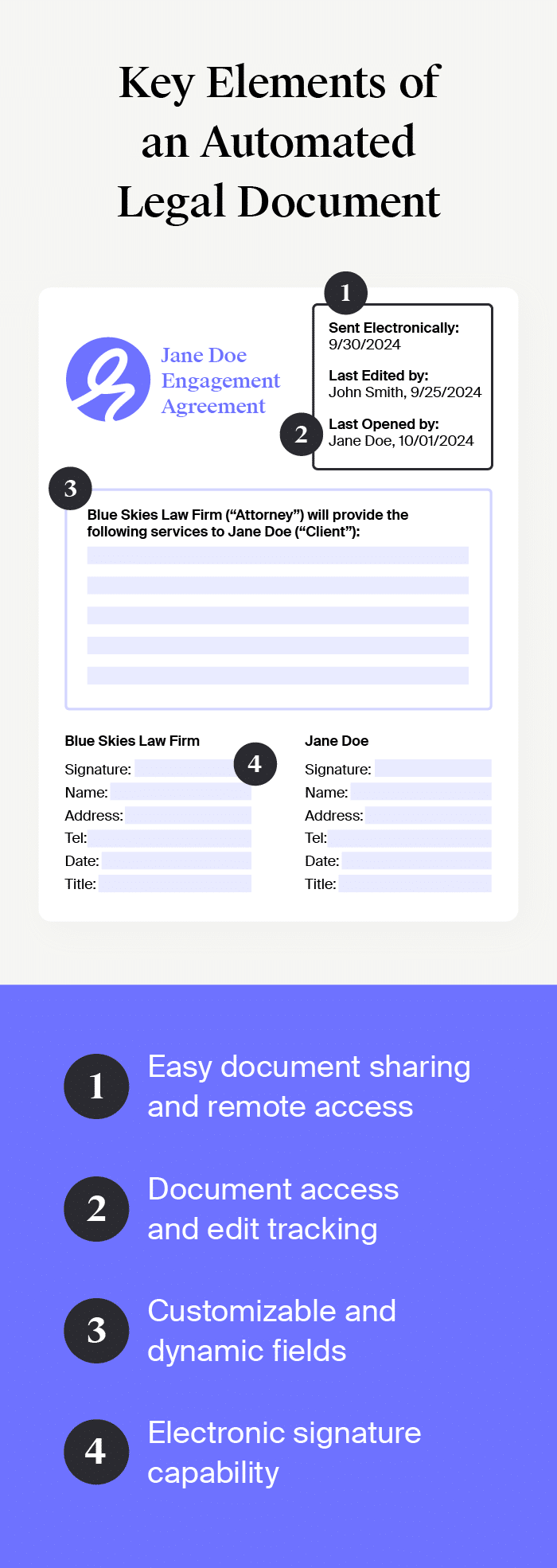
Many word processors come pre-built with templates. However, a legal document automation solution will include several customizable fields. This includes dynamic fields that auto-fill data, fields you can edit, and fields that update based on other information in the document.
For example, if you designate a field as “Client Name,” the platform will look at the name logged for the case and auto-populate it into your document.
Below are common advanced document automation fields to look for:
- Short text allows users to enter one line of text (example: client legal matter)
- Long text allows users to enter multiple lines of text (example: client address)
- Date allows users to select a date (example: issue date)
- Number allows users to only enter numeric values (example: cost of service)
- Single select allows users to select one pre-defined option (example: jurisdiction)
- Multi-select allows users to select multiple pre-defined options (example: contracted services)
- Conditional allows users to specify criteria that determines the contents of this field (example: if the total cost of service exceeds $5,000, the user will be presented additional billing questions)
- Formula performs mathematical operations based on data from other fields (example: invoice total a balance minus previous payments received)
In addition to having smart fields, these solutions can also include clause libraries with templated language that’s easy to edit and reuse across documents. Similar to document templates, edits to these clauses will be reflected across all future versions.
Electronic Signature Capability
The best document automation for lawyers includes electronic signatures or e-signatures—a quick and convenient way to collect legally binding agreements. This feature enables lawyers to reduce non-billable time spent on printing documents and following up for hard-copy signatures. When shopping for e-signature software, look for solutions that offer an audit trail and encryption.
Document Sharing and Tracking
Your busy workflow consists of sending legal documents to clients and co-counsel, as well as meeting docketing deadlines. The best software systems offer easy and secure cloud-based document sharing and collaboration to ensure everyone has access to files. These solutions can also send auto-updates when documents have been viewed, edited, or shared—and allow you to control when those actions are possible.
When sharing documents, you may end up with multiple versions and waste time tracking down the latest version. MyCase combats versioning issues by merging multiple document versions into one file.
Remote Access
Remote (and secure) access to work is more important than ever. The American Bar Association’s 2023 Practice Management TechReport found that 85% of firms with more than two lawyers could remotely access their workstations. Cloud-based software allows your team to securely access legal documents and communicate from anywhere.
For instance, MyCase Drive allows lawyers to access and manage files from the cloud. You can quickly jump on a laptop or mobile device to find and edit documents. Additionally, any changes made within MyCase or your desktop are automatically synced in real time.
Organized and Unlimited Storage
With the constant need to store documents, unlimited storage is a valuable feature for law firms. Eliminate the time suck of tracking down important documents by using a reliable, centralized document storage solution. We recommend looking for unlimited cloud-based solutions with automatic cloud backups.
Using MyCase’s Document Management allows you to tag and organize documents with a simple drag-and-drop functionality. Its customizable filtering system makes it easy to locate your files, while Full Text Search takes this a step further by helping you locate specificcontent within PDF and DOC files.
You can also take advantage of MyCase IQ’s document summaries feature (currently in beta). This upcoming feature will allow you to view summaries of a document’s contents to quickly find the information you need.
The post Guide to Finding the Best Legal Document Automation Software in 2025 appeared first on MyCase.