

Every so often, a small design element quietly does big things. This week, we’re highlighting a new feature—one that sits at the intersection of subtlety and effectiveness: the CTA (Call To Action) section, now available in our Stoddard WordPress theme.
You might’ve seen this new addition on this very blog. Just below the main content, there it is: a crisp, bold rectangle featuring a direct headline, a line or two of supporting text, and a strong action button that invites you to take the next step:
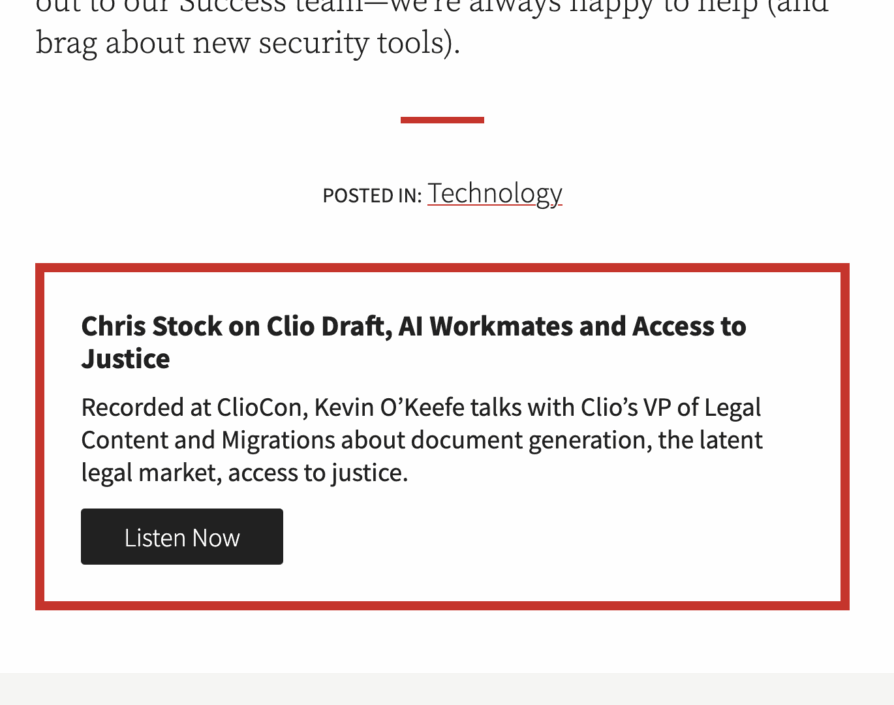
Let’s take this one apart for a moment.
- Headline: Direct and benefit-driven, e.g., “Chris Stock on Clio Draft, AI Workmates and Access to Justice.”
- Supporting copy: Adds context. What is this about? Why should I care?
- Action button: “Listen Now,” with a clear visual presence.
It’s simple, but that’s exactly the point. The new CTA section is about putting a single, discrete action in your reader’s path—at exactly the moment when they’re most likely to be receptive.
Oh, and the color: The border color inherits from the designated accent color for your blog. In our case, it’s LexBlog red.
Why Add a CTA Here (and Not as a Pop-Up)?
Let’s talk about what we’re not doing: interrupting your readers with pop-ups. We’ve all experienced those abrupt calls-to-action that cover the content and break the flow—annoying at best, alienating at worst. That’s not the experience we want for your blog, or ours.
Instead, we’re putting the CTA right in the single post template—woven into the natural progression of the page. It’s always contextually relevant; gently present, never intrusive. Want your readers to subscribe, listen, download, or reach out? Now you can make that ask at exactly the right moment—after you’ve delivered real value with your content.
Why Add the CTA at the End of the Post (and Not in the middle)?
Respect and credibility.
Respect: We believe it’s disrespectful to the reader to interrupt their flow mid-article.
Credibility: Your credibility as a blogger is at its highest at the end of a well-written post, so we believe this is the appropriate moment to call users to action.
What Makes a Great CTA?
If you want to get the most from this feature, here are a few tips—drawn from years of seeing what works (and what doesn’t) across thousands of LexBlog sites:
1. Be Clear About What’s Next
Keep your headline short and direct. The action you want is front and center: “Download Our Free Guide,” “Join Our Newsletter,” “Read the Full Report,” or—in the podcast example above—“Listen Now.”
2. Use the Supporting Copy to Build Value
This is your elevator pitch. In a sentence or two, explain the benefit, not just the action. Why should your reader take this step now? What will they gain on the other side of that button?
3. Keep Button Labels Actionable
“Learn More” (our default label) is fine, but specific is even better. “Listen Now,” “Subscribe Free,” “Book a Call,” or “See Example Brief” all set clearer expectations and encourage clicks.
Examples You Can Use Right Now
Here are a few proven patterns that fit nicely in the new CTA section:
- Podcast Callout: Title: “Listen to the Latest Episode” Copy: “Discover new trends in legal tech and hear from leading voices. Available on all platforms.” Button: “Listen Now” (link to your podcast episode)
- Newsletter Invitation: Title: “Get Weekly Legal Insights” Copy: “Sign up to receive must-read legal analysis and news, straight to your inbox every Friday.” Button: “Subscribe Free” (link to your signup form)
- Resource Download: Title: “Download Our 2024 Litigation Guide” Copy: “Packed with best practices for today’s legal landscape. Free for email subscribers.” Button: “Get the Guide” (link to download page)
- Event Registration: Title: “Register for Our Next Webinar” Copy: “Space is limited—claim your spot for our deep-dive on remote depositions.” Button: “Save My Spot” (link to registration)
How To Set Up Your CTA
If your site runs the Stoddard theme, you’ll find new fields in your theme settings:
- Title (headline)
- Text (supporting copy)
- Button label (action)
- URL (where the button should go)
Don’t overthink it—start with what makes sense for your current content or business goal. Then, as you see what your readers respond to, tweak the language, switch up the action, and keep making it better.
One CTA, Not a Cluttered Mess
We’ve intentionally limited the CTA section to one per blog. It’s about focus, not overwhelm. A blog should have a single, clear takeaway action for your readers—not a buffet of outbound links.
The Bottom Line: Small Change, Big Results
The web is full of bells and whistles. This is not that. Instead, the new CTA section in Stoddard quietly amps up your power to convert readers into listeners, subscribers, or clients—without ever getting in their way.
Set it up. Try a few variations. See what changes. Sometimes the smallest box on the page makes the biggest difference.
If you need help getting your CTAs just right (or want to see examples from other LexBloggers), reach out to the Success team. We’re here to help you make every post count.