
Reading Time: 5 minutes
I have been thinking a lot about the resilience of this website. Over time, I have stopped linking to live copies of resources because they disappear. I have been blogging for over 20 years and there are still people looking at posts I did early on where every resource I linked to has succumbed to the passage of time. My ideal would be to get to the point where I can save everything I link to on my own server, making a visit self contained. I’m still putting these pieces of the puzzle together.
I actually wrote an entire post about the URL problem and then decided that it did not represent the direction I want to go. I had been thinking about using YOURLs, a short URL builder that allowed me to create the pointing link. In that way, when I save a file out to the Wayback Machine or an Archive Today site, I could potentially point to the live resource and then switch to the archived copy only once the original disappears.
This adds too much complexity and, while I still have a YOURLs implementation, I am only going to use it for shortened URLs, not for resilience reasons. There are still times where I would like to see if a link is followed, since YOURLs captures click traffic analytics like Bitly, or the long link is too long to share via cut and paste.
There are, of course, archiving sites like Perma.cc. But I am really looking for something that I can manage myself. Not a third-party, not a subscription that I have to maintain in perpetuity or one where I have to risk the other end of the arrangement disappearing or altering the terms. I am already planning to return to hosting my web content from an internal server instead of a commercial web host in the next few years.
It’s not even that these organizations will disappear. You already cannot save an American Bar Association page on either Perma or the Wayback Machine, because the ABA blocks their copying. They are not the only site I’ve run into issues with, which is when I flip to an as-you-see-it archival tool like Archive Today. But I would really like to save everything in one container.
Over time, this led me to thinking about the consumer or individual tools that people use to save information for their own use. Since those are invoked when the person is reading the information, perhaps that would be a good direction to go. When Mozilla’s Pocket went belly up last year, it reminded me of the read-it-later apps. Perhaps that’s where I should be looking.
Put It In A Bag
This led me to Wallabag. At first, I wasn’t sure if it was an application for me. Like a lot of open source projects, you can use a commercial, hosted version of it or you can roll your own. When you are on your own server, this sort of self-hosting works fine. When you are on a commercial host like I am at the moment, it can be somewhat less easy. I subscribe to the most basic web hosting and that limits some of the behind-the-scenes tools that I might need to install a more complicated piece of software.
In this case, though, it turns out that Wallabag is available through a CPanel or Softaculous installation. There are two benefits for this. First, I don’t need to find a way to install it separately from my main website. Second, a Softaculous install is really point and click. It means that anyone who wanted to run a Wallabag instance could do it with no real technical expertise.
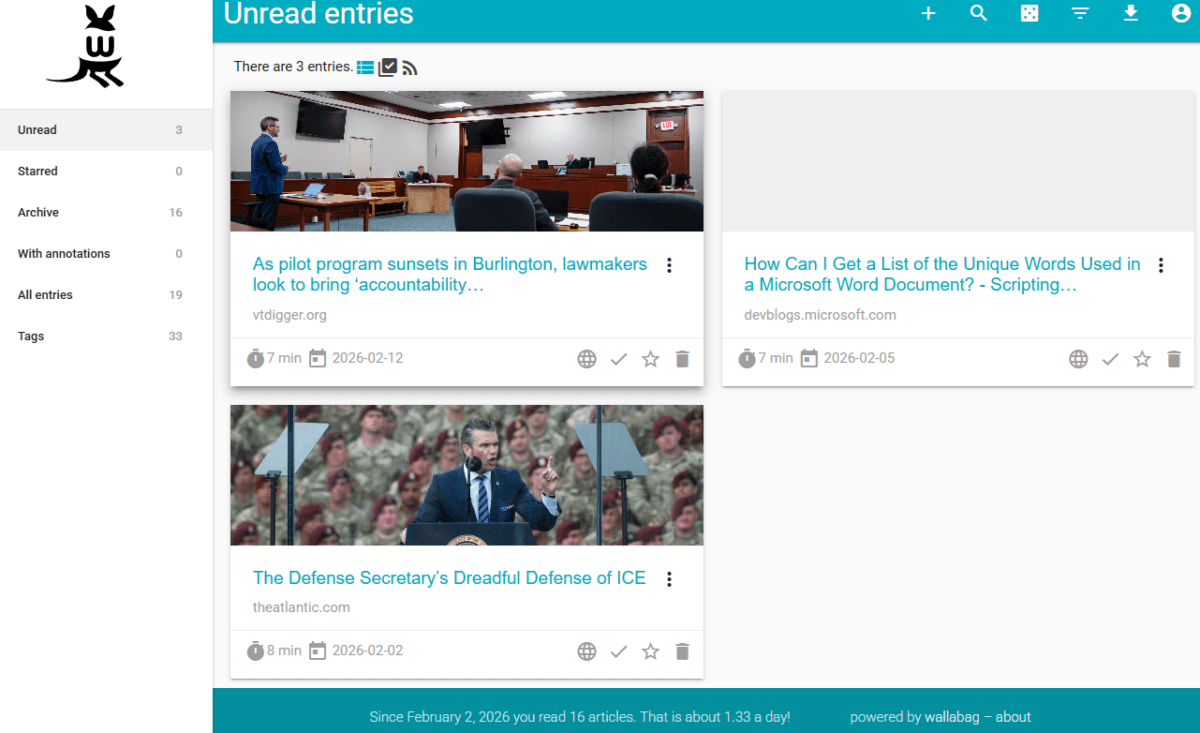
Wallabag can also be run in a container like Docker, which is probably where I will focus in the future. At the moment, I don’t have a place to spin up virtual containers but I am thinking of running a Synology NAS for my web server. It can handle Docker containers and not only would that be a great opportunity for me to learn something new, it would open up a much wider range of archival tools. The benefit of an existing Docker image is, again, that you do not need to build the image yourself but can install and configure it, reducing the technical knowhow required to get up and running. I have always found this a better way to learn as I go, since I have an example to look at before I try something from scratch.
So far, Wallabag is working well for me. Since it can grab any page I am looking at, it can save pages that are behind paywalls if I have access to them. This means I’ve been able to grab content while in an EBSCO database or on commercial legal publisher sites. You can create a public link to the resource so that, if I wanted to, I could save a page and share it to my family or a work team or even just place it on a web page.
I have to admit, the administration page was a bit cumbersome. Most pages have a save button at the bottom. But it doesn’t seem to actually save until you move to a new tab or page. When I was getting started, I found that I would make a setting change and then attempt to use the feature and it would fail. I would have to return to the admin dashboard and toggle to another page and I would see a small dialog that indicated the change had been saved. So you may need to watch for this latency if you install it and are tinkering with the back end.
There is a browser extension for Google Chrome and Firefox so, while I don’t use either of those web browsers, the extensions work in Microsoft Edge and LibreWolf so I can save from any web browser in which I perform research. I also have been thinking about the expandability of the installation. It’s not a personal app so other people from your workplace or family or friends could run their own Wallabag account on your instance. You can also turn your saved file activity into an RSS feed so that you could share the RSS feed to your own reader or to a shared RSS reader or intranet.
Put It In A Container
As I said earlier, I think looking at Docker containers is eventually where I will go. I may stick with Wallabag at that point but it is clear already that it is not an archival tool. While it “archives” a page, its success at capturing all of the page is hit or miss. There are site-specific scripts it uses to try to grab as much as it can but often you are left with just text. This works for me — it even grabs the text out of a PDF so I can be on PACER or Courtlistener and stash away a court decision for later — but there are times when a graphic or chart is useful. When I have something I want to read with images in it, I always go to see what Wallabag has actually saved. If it is missing elements, I’ll throw it into the Wayback Machine or Archive Today.
I think where I’d eventually like to land is to run my own instance of ArchiveBox in a Docker container. While it makes sense that a read-it-later would only capture the elements you can read, an archival tool will capture everything. From what I can tell, ArchiveBox offers the ability to capture a web resource in its entirety. It calls itself “the open-source self-hosted internet archive” and capture audio, video, and more. It is beyond my actual interests but I am curious about whether a law firm could run (or does run) an instance to help it archive web-related content for litigation purposes, and how that would hold up in court.
The other thing I like about the idea of containers is that, as so many people have already found since this is not novel technology, you can move them around. Once I have a container up and running, I can decide to move it without impacting other containers. If I decided in future to move everything back to a host, I could move the containers as well. Given that I do not currently pay for that support, I’d like to test it out on my own before I ramp up my website expenses to test it out on someone else’s dime.
The downside to all of this planning is that the resilience will end when I do. I’m not getting any younger and this website will drop off the internet just like all of those other resources. If I am linking to same domain content from my blog posts, all of that will disappear as well even if the blog page has been archived. This is particularly true now that I am aggressively blocking crawlers and AI scrapers. It is less and less likely that anything I create will end up in a random archive.
It’s not just me. Information publishers are starting to block the Internet Archive because, while the publisher can block AI scrapers, public archives like the Wayback Machine are susceptible to scraping. This will have a knock-on effect for information access.
At one level, I don’t know that I care. All of history is covered in layers of dust and much of it is lost. This blog is not a critical information resource, nor are the things that it links to. Still, I have been wondering about things like redundant links on a single outbound click: could I create a process where I provide multiple links to a resource so that one of them is likely to stick around for awhile?
I have had this domain now for 29 years. It’d be fun to be able to keep it going for that long again. And I love a new challenge. I am also feeling more positive about the future of distributed archiving. The more people who can be involved in it, the more likely important resources will survive.