
Reading Time: 7 minutes
I am coming towards the end of my book project. I am proofing the pages — which is kind of fun, a bit like seeing a movie trailer before it comes out, the words finally constrained by proper page layout — and thinking about the index. It seems common for the author to be responsible for the index, yet another editorial activity that publishers shift off their balance sheet. I am on the fence about the value of indexes in books like mine but I would still like to make an effort.
The easiest approach is to hire an indexer. I have indexers in my extended family and I value their skills. But the reality of this project is that it’s not a money maker and I’m reluctant to make much of a financial investment in it. I mean, it’s an academic coursebook and there is, for now, no way to know what kind of a market there is for it.
Add to that calculation the cost quoted by my publisher for indexing services of $3 to $5 per page. It’s a completely reasonable fee for a human to perform indexing. At 330 pages or so, I would be looking at roughly $1,000 for the index to be done professionally. I honestly don’t know if I would recoup that money at all but even if I did, it would almost certainly absorb most of the royalties that may flow from purchases.
So I am caught in the middle. I know that an index is a helpful asset to a book. I was at a conference in Denver just after I started back at the law school and was scoping out some books. I was at the stage of trying to identify possible publishers of the type of book I wanted to write. Some of the books were missing an index entirely. I didn’t read those books but when I perused them, they felt empty or less professionally done. I think an index would be a good thing.
Build It As You Write
I have written two books already. Both had indexes prepared by the publisher. I am not sure the existence of the index made much difference to the readers of those books. My assumption, based on how I would myself use my books, is that people will use the table of contents more often than they would resort to an index. There is a level of density that I think warrants an index and a coursebook or handbook like mine is not in that category.
One thing about being responsible for the index, though, is that I could start to think about it as I was writing. I have used Microsoft Word concordance files in the past and I figured, at worst case, this would be an acceptable middle road for an index. I did not at that point know what desktop publishing tool the publisher was using, so there was no expectation that what I created would work, directly, with what their system or process was. But it was a place to start.
Here’s a quick guide to how to create one but it’s pretty simple. You create a table and you list the words you want to appear in the index. If there is a nested level, you indicate that with a colon between the levels. The word list can be in any order as you create it, although I would tend to alphabetize the list periodically (click at the top of the table and sort A to Z) just so I could make sure I hadn’t missed a word or topic or concept I wanted to use.
As I was writing my manuscript, I saved the file each day I worked on it. This was a slightly paranoid approach but, as the file got bigger, I did not want to end up with a corrupted version. Periodically, I would save this daily file out to a spare copy and rename it so that I could run the index on it. This was mostly to make sure that the index was being generated the way I wanted but also it was just fun to see the indexed output. If looking at someone else’s book without an index felt empty, seeing your own manuscript with an index felt like you were actually making progress.
In the end, I had a 10 page table in Microsoft Word. A lot of that is duplication. If “Records management” and “records management” both exist, you need two entries for the concordance file. But it still works out to a healthy looking index. It is the sort of index that I think would scratch most reader’s need for a finding tool. Again, I don’t think this sort of book needs an index but (a) I’m contractually obligated to provide one and (b) it is not that hard to create one.
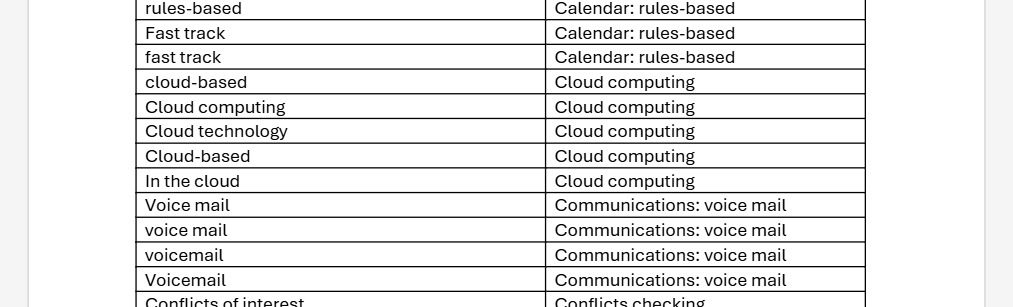
The benefit of doing it while you write is that you are thinking about the topic freshly at that moment. If anything, I probably over-included terms with this approach. I think that, had I written the entire text and then tried to create the concordance, I would have missed terms (and alternative spellings) that might have been useful to include.
Artificial Indexing
I am comfortable with the choice I made. However, I was curious as an information professional about how artificial intelligence would handle creating a concordance file. I was reluctant to load the entire manuscript into a chat interface so be warned that what follows has that limitation. My goal was to create a word list and see if a generative AI tool could improve upon it.
The first thing I needed to do was to extract all of the words from the manuscript. In other words, like an unrefined beginning to a concordance file, I wanted to create a list of every individual word in the book. I also knew I would need a Word macro to accomplish the task. Fortunately, someone had already built one! Here it is if you want to try it:
Sub UniqueWord()
'
' UniqueWord Macro
'
'

Set objDictionary = CreateObject("Scripting.Dictionary")
Set objWord = CreateObject("Word.Application")
objWord.Visible = True
Set objDoc = objWord.Documents.Open("c:[path to your document][document file name]")
Set colWords = objDoc.Words
For Each strWord In colWords
    strWord = LCase(strWord)
    If objDictionary.Exists(strWord) Then
    Else
        objDictionary.Add strWord, strWord
   End If
Next
Set objDoc2 = objWord.Documents.Add()
Set objSelection = objWord.Selection
For Each strItem In objDictionary.Items
    objSelection.TypeText strItem & vbCrLf
Next
Set objRange = objDoc2.Range
objRange.Sort

End Sub
Create a new macro in Microsoft Word, paste that in, and you are off to the races. You need to customize the objWord.Documents.Open path to open the document that contains the words you want to count. Once you have saved that change, open a new, blank Word document and run the macro.
And wait.
And wait.
My manuscript has over 120,000 words and this is not a very efficient script. It froze Microsoft Word each time I ran it. But I left it to run over night and the next morning, forced Microsoft Word to crash. Then I restarted Word and it recovered the word list. This is not a pretty way to accomplish the goal but it worked. I expect that, if you have a shorter text, it may work more efficiently and your blank Word document will become accessible after a period of time.
The list had nearly 8,000 unique words in it but, as I reviewed the list, I saw that the macro had seen every element that had spaces around it as a word. So I had words like “a”, “b”, “c” and so on. It also had sometimes identified a word as unique when it was a duplicate, because “art” and “art ” (with a trailing space) were counted as different, for whatever reason.
I copied the words and pasted them into a Notepad text file. I saved that as a .txt file and then imported it into a blank Microsoft Excel worksheet. Once in Excel, I could use the deduplication function to clean up the duplicates. Then I added a column and used the LEN function to count how many letters in each adjacent cell ( =LEN(A2) ) and sorted the remaining words by the number of letters in them. I deleted any that were 1 or 2 characters and my word list was now down to about 5,600.
That was still too many to manually review. Also, I knew I had stop words (“and”, “the”) and words that I would not index (adjectives, etc.) no matter how long they were. So I thought I would run the word list through a generative AI tool and see what it came up with.
I started with Claude’s free level. I quickly stopped because it froze on the first attempt and then just spun and spun on the second. After the first, frozen attempt, I opened a second chat window up but with Microsoft CoPilot in it. This worked very well although it would have been interesting to compare outputs.
The prompt I used was:
I need a concordance for a book index. Use the attached file, which contains all of the words that appear in the book. Exclude all words under 5 characters unless they are a common acronym or initialism, like crm. If they are an acronym or initiliasm, capitalize them appropriately. For all words, include only those that are related to technology concepts or lawyering skills like ethics. Exclude commonly used words that would apply in any business writing, including adjectives and other descriptive words. Exclude all stop words like "a" and "and" and "the. Capitalize the first letter of any word in the concordance list. Review the list for common legal technology concepts, like litigation support or practice management, and combine words in the list to reflect those common topics.
I am not sure if the last sentence helped or hindered. I will say that it’s existence was an attempt to help the bot join up some of the words that, if it had had the manuscript, it would have likely connected but that, in the word list, were disconnected. I have a feeling that this led to some unintended results.
The CoPilot bot returned the instructions back to me for confirmation and we went through two or three more check points on how it should create it. This was more detailed than I had expected. These stages of questioning were helpful because they were probably things I could have had in my prompt but did not think to include or did not know how to word:
- Alphabetized by topic, with sub entries, or alphabetized as one continuous list
- After I asked the bot to expand the list (the original list was very abbreviated), it asked if I wanted more topics or terms or both
- Finally, the bot prompted me to tell me how broadly to expand the list (150-200 entries, 300-500, 500+).
Human In The Loop
The output was … fine. I chose the maximum list and it ended up generating just over 500 entries. Some of them were helpful and some of them were not. I got the sense that the list was drawing from some generic technology concepts and the bot had joined together terms because of that generic glossary. While the terms did exist in the term list, they would not appear in those connected ways in the text. I am sort of curious to see if found some phrases that I excluded from my initial concordance but I’m not (yet) curious enough to try to script that lookup or retrieval process.
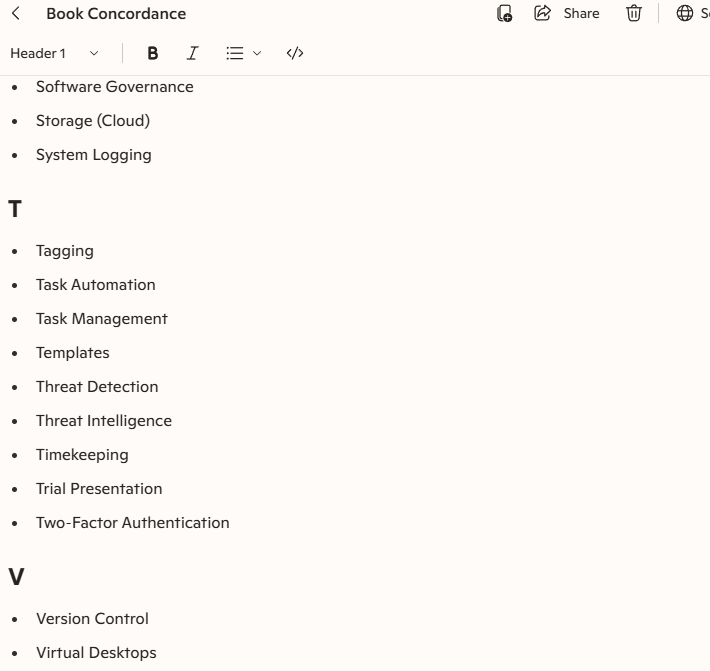
One thing the CoPilot-generated list was useful for was to help me compare and contrast the words that I had on my own list, which is longer. It includes words that I’d excluded as well as these novel phrases — “automated document assembly”, “cyber hygiene”, a bunch of sub-genres of governance — that are assuredly not in the book in that format. Nor are they, for the most part, phrases that I think anyone would look for in an index. This is where I think the AI showed its robot brain a bit, tacking on a common second word to a bunch of individual first words: lots of “record X” and “x governance” that feel more like marketing speak than applicable index terms.
I feel more confident that, as both the author and the subject matter expert, my hand-crafted concordance list in Microsoft Word is more than enough for this project. If it turns out that the first edition becomes a huge money spinner and I have to write a second edition, I can reconsider a professional indexer at that time. I doubt that I would use a generative AI to create an index by uploading a manuscript to it. Surely the generative AI companies have stolen enough authored content that I do not contribute another resource to their training. But even with the attempt that I made here, I can see that there would still be some work to go back through and comb out the hopeful additions or buzzwords that I don’t think would be useful to a person using an index.